
December 25, 2025
How Can You Install Netflix on Huawei in 2026?
Using Netflix on a Huawei phone in 2026 requires a bit of guidance. Huawei’s dynamic range of smartphones, coupled with their proprietary software solutions, offers a unique user experience. However, installing popular apps such as Netflix can be tricky. This blog offers step-by-step instructions and tips for safely installing Netflix on Huawei devices in 2026. Dive in to learn about compatibility, the role of Huawei Mobile Services (HMS), and the significance of Google Mobile Services (GMS). In addition to official methods such as Huawei AppGallery, this post covers alternative solutions like using GBox and trusted APKs. We prioritize user safety and device security, ensuring you have the best streaming experience. Explore viable options and explore the advantages of each method. By the end of this guide, you will confidently install and enjoy Netflix huawei on your Huawei phone with ease.
Understanding Netflix Compatibility on Huawei Devices
Why Netflix Is Not Preinstalled on New Huawei Phones
New Huawei phones no longer come with Netflix preinstalled, which limit the use of Google Mobile Services (GMS). Without GMS, acquiring certain popular apps like Netflix becomes less straightforward for Huawei users. Consequently, Huawei relies heavily on its own ecosystem, Huawei Mobile Services (HMS), to power its devices, making direct compatibility with some applications challenging. Despite these hurdles, it is still possible to enjoy Netflix on Huawei smartphones through alternative installation methods. The absence of GMS doesn’t eliminate the possibility; it only alters the roadmap. Huawei’s commitment to enhancing user experience through their AppGallery and introducing tools such as GBox helps bridge the gap, enabling users to access their favorite apps. Understanding these nuances ensures users won’t be left without access to their favorite streaming service.
AppGallery, HMS, and the Role of Google Mobile Services
Huawei AppGallery has become a cornerstone for Huawei users seeking applications. As Huawei’s official app distribution platform, it compensates for the absence of Google Play Store owing to the U.S. restrictions. In the absence of GMS, Huawei has focused on strengthening its HMS ecosystem. HMS offers core functions such as location services, in-app purchases, and advertisements, crafting a robust environment for app developers and users alike. However, apps built with a heavy dependency on GMS, like Netflix, require alternative avenues for installation. Through initiatives like Petal Search and specific AppGallery tools, Huawei attempts to streamline the process of finding and installing apps that are otherwise limited. Although GMS provides comprehensive features for app functionality, Huawei’s strides with HMS and AppGallery reflect their commitment to providing seamless user experiences despite existing challenges.
Official and Recommended Ways to Install Netflix on Huawei
Installing Netflix via Huawei AppGallery Tools
To install Netflix on your Huawei device using AppGallery, start by accessing AppGallery. Although Netflix may not always be found directly on the platform, Huawei often updates its tools to simplify app installations. Use the Petal Search tool, a Huawei-developed search engine integrated into AppGallery, designed specifically to locate and guide the installation of apps. Enter “Netflix” in the Petal Search bar. Upon finding Netflix, Petal Search will direct you to the most appropriate installation path, such as downloading an APK from a recommended website. Follow the on-screen instructions to download and install the Netflix APK. Huawei ensures these pathways are safe and reliable, minimizing potential security risks. Always read user reviews and check ratings before proceeding with downloads. This approach effectively utilizes Huawei’s ecosystem, aligning with their constant updates, and emphasizing user convenience and security.
Using GBox to Access Netflix on Huawei Phones
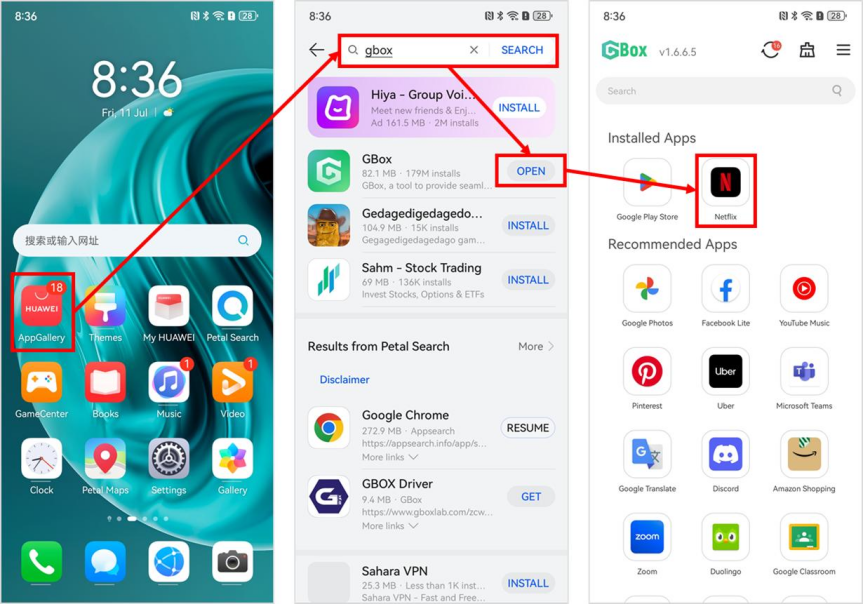
GBox is another viable tool for installing Netflix on Huawei phones. Start by downloading GBox from the Huawei AppGallery. This third-party application acts as a bridge, enabling access to apps that are not natively supported by HMS. Once GBox is installed, launch it and search for Netflix. GBox facilitates the retrieval and installation of the Netflix app, leveraging its own infrastructure to mimic GMS where needed. Follow the guided steps on GBox to safely download and install Netflix on your device. This method offers a secure alternative for users facing restrictions due to the proprietary nature of HMS. GBox’s popularity stems from its ease of use and its seamless integration with Huawei devices. This solution reflects Huawei’s adaptability and user-focused innovation, addressing the limitations imposed by external restrictions in a practical, efficient manner.
Alternative Methods to Watch Netflix on Huawei in 2026
Installing Netflix APK Safely from Trusted Sources
For those inclined to explore APK installation, obtaining Netflix via APK from trusted sources is a popular choice. Begin by identifying renowned APK platforms, such as APKMirror or APKPure, known for vetting their content strictly. Access these platforms from your Huawei device’s browser and search for Netflix. Always verify the version offered matches your device’s compatibility. Before downloading, ensure your device settings allow installations from unknown sources; this typically ensures safer transitions during APK installations. Once downloaded, open the APK file and follow the on-screen prompts to install Netflix. Upon completion, Netflix should appear among your installed apps, ready for use. Users should remain vigilant, managing permissions diligently to preserve device security. This method is advantageous for users keen on maintaining up-to-date app versions not directly available in AppGallery or other native platforms.
Using Web Browsers and Progressive Web Apps
Another alternative is accessing Netflix through web browsers or utilizing Progressive Web Apps (PWAs). Open your preferred web browser on your Huawei device and navigate to Netflix.com. Log in using your credentials to begin streaming. For an app-like experience, consider installing a Progressive Web App. When on the Netflix website, you may see a prompt to “Add to Home screen.” Accepting this option allows you to create a PWA, a lightweight version of Netflix offering functionalities akin to the native app without occupying significant storage. This method ensures Netflix is readily accessible without traditional installations, providing an adaptive user experience across various devices. Moreover, PWAs receive regular updates, guaranteeing performance improvements parallel to those seen in standard apps. Utilizing web browsers and PWAs offers convenience and flexibility, suitable for users valuing minimalistic and efficient navigation methods.
Conclusion
Installing Netflix on Huawei phones in 2026 is achievable and ensures a rewarding user experience. Despite the absence of GMS, options such as Huawei AppGallery tools and GBox facilitate seamless integration of Netflix to enhance streaming convenience. For those requiring alternative methods, downloading trusted APKs or using web browsers and PWAs present effective solutions. Each method brings its benefits, from the security of AppGallery pathways to the simplicity of browser-based Netflix access. By following the safest paths and staying vigilant about security and permissions, users can enjoy uninterrupted access to their favorite shows and movies. Adapting to these approaches reflects Huawei’s and its users’ resilience and ingenuity, ensuring entertainment remains within reach, whatever the external challenges may be.